Cartoon of stressed-out church volunteer managing tech at Sunday service

So, you need a new website?

Part of the Accidental Techie series, and the Parish Websites series.

At some point, many churches arrive at the same moment.

You realise you need a website — or a better one — and you’re not entirely sure how that decision got made, only that it now involves you.

Sometimes it’s obvious.

Sometimes it’s gradual.

Sometimes it arrives disguised as a perfectly innocent sentence like:

“Well… the website probably needs someone to look after it.”

Congratulations.  You are now the Parish Webmaster.  (There’s no badge.  Sorry.)

Before you panic, take a breath.  This happens all the time.  You don’t need to become a web expert.  You just need to build something sensible, survivable, and kind to the next person who inherits it.

What A Church Website Is Actually For

Let’s clear something up early.

A church website does not need to:

  • look trendy
  • update weekly
  • win design awards
  • impress other churches

It does need to do a few very ordinary things, very reliably:

  • help people find you
  • help them work out who you are
  • help them turn up at the right time and place
  • help them contact a real human

Think of it less as a magazine and more as a signpost. 

If it’s clear, accurate, and doesn’t fall over, it’s already doing ministry.

The Minimum Viable Church Website
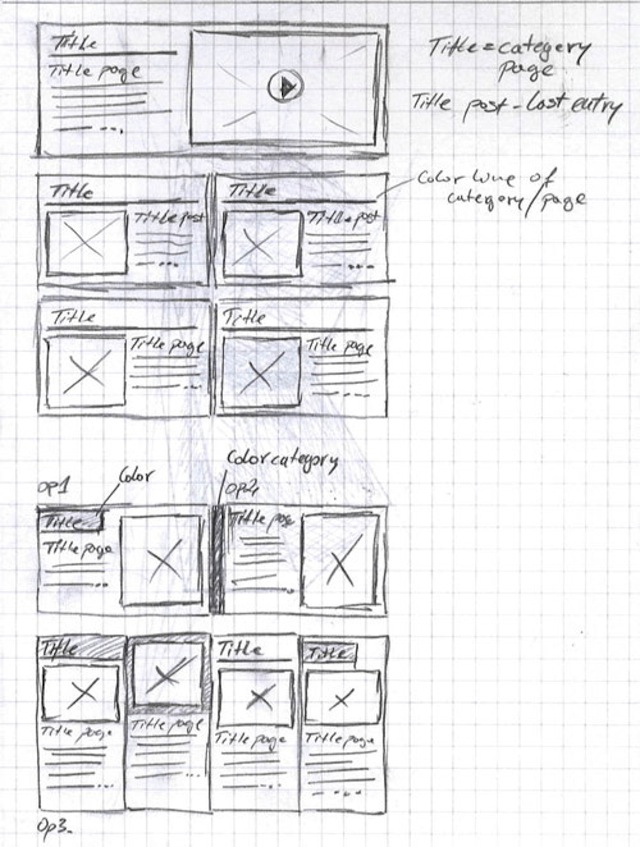
Sample handrawn wireframe diagram for a simple website

One of the biggest reasons people stall is because they think they need to build everything.

You don’t.

A perfectly respectable church website can be:

  • a small set of pages, or
  • a single, well-structured long-scroll page that covers the basics clearly.

Both are valid.  Neither is a shortcut.

In practice, the core content usually looks like this, whether it’s split across pages or sections on one page:

  • Home / Welcome – who you are and what sort of church this is
  • Service times and location – clearly, unambiguously, and correctly
  • About – a bit of story and context
  • Contact – how to reach someone who actually replies
  • (Optional) Events or ministries, if you genuinely use them

If all of that lives on one thoughtfully laid-out page, that’s fine.  If it’s spread across a handful of pages, also fine.

If your site never grows beyond this, that’s not a failure.  That’s a working system.

A Few Decisions You Only Need to Make Once

There are some decisions you can’t dodge — but the good news is that you only need to make them once and then stop thinking about them.

In particular, make sure your site has:

  • Backups
    Not because disaster is inevitable, but because humans make mistakes and computers are funny beasts.  A rewind button is holy.
  • Basic analytics
    Used gently, this answers simple questions like “Is anyone finding us?” and “On what device?”.  This is stewardship, not surveillance.  This information allows you to make your website better over time.
  • Clear access control
    Not everyone needs admin access.  Future-you will thank present-you.

If you do nothing else, do these things and move on.

Why WordPress Is a Sensible Default

There are lots of ways to build a website these days.  Some are quicker to start.  Some are shinier on day one.

WordPress is still a sensible default for churches because it does a very unglamorous but important job well:

  • it’s widely used and well supported
  • there are plenty of themes that assume boring but faithful content
  • it doesn’t require a full-time web team
  • it copes remarkably well with volunteer turnover

It’s not perfect.  But it’s forgiving.  And forgiveness turns out to be a surprisingly important design feature in church life.

Updates: Accuracy Comes First.  Everything Else Is Optional.

Before you worry about how often the website is updated, worry about whether it is correct.

If something changes —

  • service times
  • locations
  • contact details
  • people named on the site

… then the website should change too.  Now.

An out-of-date website doesn’t just look a bit sad; it quietly misleads people who are trying to find you.  That’s not great hospitality.

Once the basics are accurate, everything else becomes a strategy decision.

Ask two honest questions:

  • What are we actually trying to achieve with this site?
  • What can we realistically sustain?

If you decide:

  • monthly posts — then post monthly
  • quarterly updates — completely fine
  • occasional notices only — also valid

What matters is that you do what you said you would do.

A quiet, accurate, predictable website serves a parish far better than an ambitious one that runs out of steam after three enthusiastic weeks.

Rule of thumb:
under-promise and over-deliver.

You Don’t Have to Do This All at Once

“Building a website from scratch” sounds enormous, but in practice it’s a finite, learnable process.

Most of the fear comes from not knowing where to start, or from thinking you have to get everything right the first time.  You don’t.

A working website you understand is better than a perfect one nobody can maintain.

Help exists on a spectrum — from “sit next to me while I do this” to “please just handle it” — and it’s entirely reasonable to choose the level that fits your capacity right now.

If all you do this week is get the basics online and correct, that’s already faithful work.

If you’ve found yourself responsible for a website you didn’t ask for, you’re not alone.
This is doable. And you don’t need to lose your sense of humour — or your theology — along the way.

Peter Lane is Principal Consultant at System Design & Communication Services and has over 30 years of experience with Technology systems.    We invite your questions, suggestions and ideas for articles.   These can be submitted either through the editoror by email to dct@dct.org.nz We also operate a website focused onbuilding a community of people interested in improving how we use technology in churches, located at dct.org.nz  

What Churches Actually Do About Copyright

Because “we’ve got CCLI, right?” isn’t quite the full story.

A few months ago, a property manager — let’s call him Zephaniah — sent a message through the Diaconate of Church Technologists website.

“There seems no ‘generic’ copyright agency for YouTube — unlike CCLI.  The implication is to contact the original creator.  Easy to say, nearly impossible to do.  What do other parishes do?”

It’s the sort of question that lands in church inboxes everywhere: earnest, sensible, and hiding a small storm behind it.  Because every congregation that’s ever dropped a YouTube clip into worship has quietly wondered the same thing: surely everyone else does this too — so it must be fine … right?

A can of legal worms

When I finally replied, I had to confirm Zephaniah’s worst suspicion.  There’s no magic licence that lets you stream or re-use YouTube videos in worship.  Not CCLI, not OneLicense, not any of the “we’ve paid for it, so we can use it” myths that circulate around sound desks and vestry tables.

The only safe way is explicit permission from the creator — and, yes, that’s about as practical as it sounds.  You can send the message, but there’s no telling whether you’ll ever get a reply before Sunday.  Or Lent.

The weary truth

Zephaniah wrote back a few days later with the kind of honesty that makes you both laugh and sigh.

“There is no quick way of resolving YouTube licensing.  I contacted a creator once; they responded two months after we wanted to use the material.  I suspect we will continue to be illegal where we can’t resolve the issue.”

He added, hopefully, that their livestreams are unlisted on Vimeo, private except for public events like funerals.  Which is better than nothing — but still not the iron-clad legal defence we’d all like to imagine.

And there it is: the lived reality of church copyright.  Not rebellion, not carelessness — just the ongoing collision between pastoral urgency and publishing law.  The desire to make worship beautiful this Sunday colliding with a system that moves at the speed of email.

“Private enjoyment” isn’t public ministry

At the heart of it all is one deceptively simple rule: once other people can see or hear something through you, you’ve entered the world of publishing — and publishing requires permission.

That means:

• A hymn lyric on a PowerPoint slide = fine if covered by your CCLI licence.
• The same lyric in a recorded or streamed service = not fine without the streaming add-on.
• A YouTube video played in-person to your congregation = probably illegal unless the creator has given permission for public performance.
• Downloading that clip, trimming it, and embedding it in your stream = definitely illegal.

The line between “private enjoyment” and “public use” isn’t blurry — it’s just routinely ignored, mostly by people trying to do the right thing in impossible timeframes.

Why it happens

Churches run on volunteers, goodwill, and looming Sundays.  The worship team plans something inspiring; the tech volunteer finds a video that fits; someone says, “Can’t we just play it?” There’s a moment of hesitation, then a collective shrug, and away we go.

It’s not malice; it’s maths.  Getting permission can take weeks.  Sunday happens every seven days.

And yet, as streaming has turned every service into a potential broadcast, the stakes have quietly risen.  A forgotten YouTube credit, a background track in a recorded funeral, a borrowed lyric sheet — each one is a breadcrumb trail leading back to a potential infringement notice.  Enforcement is rare, but not impossible — and when it hits, it’s unpleasant.

Five common myths (and quick reality checks)

“We’ve got CCLI, so we’re covered.”
Maybe.  CCLI offers different levels of coverage, and the right combination can include streaming rights — but many churches either don’t have that tier or don’t understand what it includes.  If you can’t say exactly what your licence covers, you probably aren’t covered.
“It’s okay if it’s unlisted.”
Privacy settings reduce visibility, not liability.  “Unlisted” is still public distribution in legal terms.
“Everyone does it.”
Everyone also parks badly outside the church hall.  Popularity isn’t legality.
“It’s ministry, not commerce.”
Copyright law doesn’t distinguish motive.  Whether you’re saving souls or selling soap, permission still matters.
“No one’s complained yet.”
That’s not the same as permission.  It just means you’ve been lucky so far.

So, what can we actually do?

Use authorised material.  Stick to content explicitly licensed for worship or under Creative Commons terms.
Ask early.  If you really need a specific video or piece of music, contact the creator long before you build the service around it.
When in doubt, leave it out.  Or, better still, use a short “Paused for copyright compliance” slide — a small act of integrity and a guaranteed congregation chuckle.
Check your hire agreements.  If you rent your venue for concerts or community events, make sure the hirer carries responsibility for any copyright issues.

None of this will make your services less creative.  If anything, it might push us toward more original storytelling, live music, and community-made video — things the algorithm can’t flag.

A note of grace

Most churches aren’t trying to cheat the system; they’re trying to tell stories well.  But perhaps it’s time to treat copyright not as a bureaucratic nuisance but as a form of neighbour love — respecting the people whose words, melodies, and images make our worship richer.

As one worship leader put it to me:
“We want people to meet God, not lawyers.”

Fair enough.

Join the conversation

If this all feels uncomfortably familiar, you’re in good company.  On 19 November, the Diaconate of Church Technologists (d|c|t) is hosting an open Q&A with CCLI — an Ask Me Anything for the faithful and the frazzled alike.

It’s not one narrow topic.  Bring the messy questions — about text, video, livestreams, lyrics, background music, or anything that’s made you hesitate before pressing Play.  We’ll unpack what’s legal, what’s pastoral, and what’s simply worth doing better.

No guarantees of quick fixes — but plenty of honest answers, and maybe a few laughs along the way. To learn more or register, click here for more information.

Because when it comes to church copyright, pretending “everyone does it” isn’t discipleship.  It’s just wishful thinking — and Sunday’s coming again.

What are Your AI Stories?

PS: d|c|t is also collecting stories for our upcoming Church+AI resource.  If you’ve experimented with AI for rosters, sermons, or parish admin — or simply bumped into its challenges — we’d love to hear from you: dct.org.nz/church-ai.

Peter Lane is Principal Consultant at System Design & Communication Services and has over 30 years of experience with Technology systems.    We invite your questions, suggestions and ideas for articles.   These can be submitted either through the editor or by email to dct@dct.org.nz We also operate a website focused on building a community of people interested in improving how we use technology in churches, located at dct.org.nz.


The Funeral Problem (Part 2)

Last month we named The Funeral Problem – how funerals expose every weakness in a church AV setup. This time we drop in on two friends, Sam and Jess, as they trade stories over coffee about how to survive it in practice

About Sam & Jess

Sam and Jess aren’t from the same church, or even the same tradition.  One’s used to more candles, one’s used to more guitars.  But they both wrangle church tech on Sundays, and every so often they meet for coffee in town.  That’s when the stories come out — the headaches, the hacks, and the lessons learned.  We get to listen in when the conversation turns to tech.

Sam: “I’m really pulling my hair out, Jess.  Every time someone uses the church for a funeral, it takes half of Sunday morning to put things back together again.  Projector in the wrong mode, cables swapped, and our poor volunteers staring at a blank screen.”

Jess: “Classic. Families just want the slideshow to work, so they’ll plug into anything that looks available.  Splitters, switchers, even straight into the projector.  It’s not sabotage — they just need it to work for that one service.”

The Trouble Spots

Sam: “So what do you see as the main weak points?”

Jess: “Well, first — the signal path . If you’ve got a splitter or switcher, label it clearly and keep it in sight.  Well, in sight once you’re in the tech booth, anyway.   If you’ve got some sort of dock or wall-plate, same deal.  Guests will find the unlabelled plug every time.”

Sam: “Our confidence monitor’s another.  It gets unplugged because someone decided it wasn’t important.”

Jess: “Yep. Those screens are like insurance.  The preacher doesn’t always need them, but when they do, it’s a lifesaver.  Keep it live every week, so people trust it.”

Sam: “Overflow’s a headache too.  We run our foyer from the livestream — fine for hymns, hopeless for tribute videos.”

Jess: “Exactly.  Direct feed beats internet every time.  Even a cheap HDMI splitter does better than YouTube when the video tribute is on.”

Sam: “And then someone waves an old iPhone at you and says, ‘The PowerPoint’s on here…’”

Jess: “That’s where you need your emergency parachute.  Best case: load everything onto a dedicated presentation laptop.  But when you can’t?  Wireless screen mirroring.  Not reliable enough for every week, but it’ll get you out of jail when the slides only exist on someone’s phone.”

Pick Your Level

Gold standard: Matrix or distribution amp, solid cabling, dedicated presentation PC.
Middle ground: Reliable splitter/switcher, confidence monitor always running, overflow fed direct.
Bare minimum: Replace flaky cables, tape down connections, keep a “reset to Sunday” checklist.
Emergency only: Fire up the wireless mirroring and pray the Wi-Fi holds.

The Takeaway

Sam: “So resilience isn’t really about fancy kit.  It’s about being able to reset to a known good state on Sunday.”

Jess: “Exactly.  The funeral director only cares about this service.  You care about every Sunday.  Build for that.”

👉 Next time Sam and Jess catch up, who knows where the conversation will go — rosters, OBS, maybe even website logins. But for today the question stands: would your setup survive the next funeral?

Read the Reflective Part 1 here → The Funeral Problem

We need your help !!

PS: d|c|t is also collecting stories for our upcoming Church+AI resource. If you’ve experimented with AI for rosters, sermons, or parish admin — or simply bumped into its challenges — we’d love to hear from you: dct.org.nz/church-ai.

The Funeral Problem

Sepia desert banner with a tumbleweed made of tangled cables. Bold text “What Could Possibly Go Wrong?” runs almost to the edge — a fitting metaphor for church systems that nearly work until they don’t.

Nothing tests a church’s technology like a funeral.

On a normal Sunday, the PowerPoint might freeze or the sound might squeal, and everyone sighs and carries on.  But at a funeral, the grieving family’s cousin turns up with a USB stick, the funeral director wants a tribute video right now, and the operator’s prayer is simple: Lord, let HDMI be merciful today.

The Funeral Problem Defined

“The Funeral Problem” is shorthand for any big, emotional service where the usual church systems are asked to cope with outsiders and surprises.  Weddings, carol services, school prizegivings — they all bring the same pressure.  But funerals are the clearest example: high emotion, high expectation, and no time for fixing cables.

And here’s the catch: what feels “good enough” on Sunday morning often falls apart when the funeral arrives.

Two Faces of the Problem

Sometimes, the outsider makes it work.  A cable gets rerouted, a bit of software is installed, or a laptop is plugged in directly.  The funeral runs smoothly, everyone is thankful — but by Sunday the volunteers are left with a mess.  The confidence monitor has vanished, the livestream no longer talks to the projector, and nobody knows what’s been changed.

Other times, it doesn’t work at all.  The slideshow won’t open, the sound cuts out, the video freezes.  And instead of quiet dignity, the room fills with stress.  Families remember the tribute that never played; volunteers remember the panic of being blamed; and the community remembers that this church’s system failed at a funeral.

Why It Matters

Technology glitches are annoying on Sunday.  At a funeral, they hurt.  Grief plus frustration is a painful mix, and a single failure can damage trust in the church’s care.

It’s tempting to shrug and say, “We’ll cope.”  But fragile systems invite shortcuts, and every outside event becomes a gamble.  True reliability isn’t just “it worked today” — it’s “it can reset and work again tomorrow.”

What Can Be Done

The good news is that churches don’t need fancy systems to do better.  Options include:

  • Investing for resilience: systems designed to reset easily, with confidence monitors and overflow screens that just work.
  • Stabilising what you have: fix broken cables, tidy workflows, and train volunteers.
  • Hoping for the best: the cheapest choice, but the riskiest — every funeral could be the one that fails.

The Pastoral Payoff

Reliable AV isn’t about looking professional.  It’s about care.  When families walk into church on one of the hardest days of their lives, they should be able to trust that the slideshow will run and the sound will hold.

Imagine a setup that just works — Sunday to Sunday, funeral to wedding, guest preacher to Christmas concert.  Reliability in our technology is hospitality in action.  It is one more way the church says: You are safe here.  We have prepared for you.

PS: d|c|t (Diaconate of Church Technologists) is also collecting stories for our upcoming Church+AI resource. If you’ve experimented with AI for rosters, sermons, or parish admin — or simply bumped into its challenges — we’d love to hear from you: dct.org.nz/church-ai.

Peter Lane is Principal Consultant at System Design & Communication Services and has over 30 years of experience with Technology systems.   We invite your questions, suggestions and ideas for articles.  These can be submitted either through the editor or by email to dct@dct.org.nz.  We also operate a website focused on building a community of people interested in improving how we use technology in churches, located at dct.org.nz.   
🛠️ What Even Is a Zoom Room (And Do You Need One)?

A Backroom Blueprint post from d|c|t — practical systems thinking for semi-clued-up churches.

Spoiler: It’s not just a laptop on a table. And no, you probably don’t need one. But someone’s going to ask eventually — so here’s what to say.

Meetings are better when they work

Whether it’s the parish council, the national board, or that hybrid synod meeting where half the room forgot to unmute — church life involves more meetings than most of us care to admit.

And increasingly, those meetings are hybrid.

So the temptation is real: what if you could fit out a room so people just walk in, press one button, and the hybrid meeting actually works — clear audio, consistent camera angles, no laptop limbo or nostril cam?

That’s the dream Zoom Room is selling.

So what is a Zoom Room?

It’s not a subscription plan. It’s not a fancy new version of the app.

A Zoom Room is a room-based conferencing system — a set of hardware and software that connects a physical meeting room to Zoom calls without needing a laptop in the middle of the table.

  • A touchscreen controller (e.g. iPad or proprietary tablet)
  • A mounted camera and microphone setup
  • A large display or TV
  • An always-on mini computer or room console
  • Optional scheduling panel outside the room

You walk in, tap the screen, and the room joins the meeting — often pulling calendar data directly from Outlook or Google Workspace via an integration with your church’s shared calendar system.

In short: it’s a video boardroom, not a portable kit.

⚙️ Note: Microsoft offers a similar setup called Teams Rooms, and Google Meet has its own flavour too. The branding and hardware may differ, but the strategic scenarios — and trade-offs — are basically the same.

Where it shines

If you’re running frequent hybrid meetings in a consistent space, room-based systems like this can be:

  • Reliable: One-button join. Minimal faff.
  • Clearer: Fixed microphones and mounted cameras usually beat a laptop mic from across the room.
  • Professional: Particularly useful when meeting funders, denominational leaders, or the bishop.
  • Integrated: Book the room in your church calendar, and the video call link is already there.

It’s also brandable, secure, and surprisingly slick — when it’s installed right and your internet doesn’t hiccup mid-motion.

Where it gets awkward

But here’s the thing. For most churches:

  • Cost is high (the gear + the Zoom Rooms or Teams licence)
  • Setup isn’t plug-and-play — expect an AV tech or integrator
  • Flexibility is limited — designed for meeting rooms, not rearranged parish lounges or multipurpose halls
  • Platform lock-in: You’re committing to Zoom or Teams. No hopping over to livestream the AGM.

And if anything fails — camera, mic, network — you still need someone who knows where the cables go and what not to panic about.

🧭 Blueprint Considerations

Before you spend the vestry’s annual biscuit budget on a touchscreen panel, ask:

  • What platform does your diocese or denominational office use (Zoom, Teams, Meet)?
  • Is the meeting space wired for consistent power, internet, and display?
  • Will this room be used by tech-fluent staff or rotating volunteers?
  • Can your budget stretch to setup and support?

So… do I need one?

Probably not.

If your main meetings are:

  • Monthly vestry in the lounge, with someone dialling in from their campervan = stick with a laptop and a decent mic.
  • Quarterly boardroom sessions, sometimes hybrid, sometimes not = you might want to simulate a Zoom Room with some carefully set up gear.
  • Frequent, high-profile, multi-location meetings with time-sensitive decisions = then yes, maybe a room-based system is worth the investment.

Just don’t assume that a one-button solution means a no-brainer decision.

Smarter spending

If your hybrid meeting experience is painful, ask:

  • Are your audio and camera setups the real problem?
  • Is someone in charge of the tech during meetings?
  • Are you expecting one solution to work for both worship and meetings? (Hint: they’re different beasts.)

Sometimes a USB boundary mic and a volunteer with a checklist beats $7000 of gear with no one to run it.

Got a hybrid setup that works?

Tell us in the comments — what’s working in your church hall, vestry room, or boardroom? We’re collecting real-world examples for future Backroom Blueprint posts.

Peter Lane is Principal Consultant at System Design & Communication Services and has over 30 years of experience with Technology systems.  We invite your questions, suggestions and ideas for articles.  These can be submitted either through the editor or by email to dct@dct.org.nz.  We also operate a website focused on building a community of people interested in improving how we use technology in churches, located at dct.org.nz.

Church + AI: We Want Your Story

We’re building something.

It’s called Church + AI — a guide to using artificial intelligence in faith-based and small-scale contexts.

Not a thinkpiece. Not a hype-fest. Not another ethics lecture (unless your story needs one).

Just something practical. Something grounded. Something that reflects what’s actually happening out there — from the Sunday service to the spreadsheet.

That’s where you come in.

If you’ve used AI in your ministry, community group, or small-but-mighty organisation — we want your story.

What worked?
What didn’t?
What surprised you?
What made you want to throw your laptop out the vestry window?

Stories can be about:

  • Preaching, liturgy or study
  • Rosters, planning or communications
  • Websites, media, or outreach
  • Anything else you tried, whether it succeeded or not

And yes — you don’t have to be a church to contribute.
If your organisation shares the same scale, constraints, or values — we’re listening.

Tell us your tale:

👉 dct.org.nz/church-ai

We’re not looking for polish. Just honesty.
(And maybe a little humour. We know what ministry life is like.)

AI, Automation and the Admin We Can’t Avoid

(aka: Why ChatGPT Can’t Replace the Parish Secretary — Yet)

I recently helped someone use AI to draft a pastoral care roster.

It confidently produced a six-week schedule — nicely formatted, evenly distributed, and even colour-coded.  A small miracle, except for one problem: it assigned duties to three people who’d moved away, one who’d passed away, and one who had, in no uncertain terms, declared themselves done with morning tea forever — and said so loudly enough that even the flower roster flinched.

That’s the problem with clever automation: it’s fast, it’s convincing… and it doesn’t actually know your people.


🤖 “Yes, and here are three ways to make your bad idea better.”

We like the idea that technology will take boring tasks off our plate. And to be fair, it often can. But AI doesn’t say, “Are you sure that’s wise?” If anything, it says, “Yes — and here are three ways to make your bad idea even shinier!”

I’ve had this same tool write notices, suggest announcements, and summarise minutes from meetings I wasn’t in.  Which, as it turns out, is still slightly better than most people manage after actually attending.  But it also generates hymns that rhyme “Holy Ghost” with “vegemite toast,” and thinks the Lay Preachers’ Network meets monthly in Rotorua, led by someone called Cheryl.  So we’re not quite ready to hand over the mailing list.


🧠 What AI can do well

There’s real potential in using AI as a support tool. It’s excellent at:

  • Summarising minutes (though more on that in a moment)
  • Rewording notices in plain English
  • Writing templated blurbs for events
  • Suggesting topics or structures for sermons, emails, or posters
  • Helping roster-wranglers match names to roles (if you feed it a correct list!)

Used well, it’s like having a patient, mildly robotic intern who never sleeps and doesn’t complain about your formatting choices.


✋ What AI can’t do (yet)

It can’t remember who swapped with who last Easter. It doesn’t know that Margaret never says yes until Dawn does.  It doesn’t see the half-raised eyebrow in a committee meeting that actually means “not now.”

AI can’t exercise discretion. It doesn’t sense relational dynamics or know when to tread carefully.  It doesn’t even blink when your most pastoral person gets assigned to prune the hedge.

And no matter how confidently it generates a suggestion, it still doesn’t know anything.  It just guesses what would look plausible based on the internet and a frankly suspicious number of LinkedIn posts.


🙃 “The minute secretary is redundant now, apparently.”

This might sound like a punchline, but it’s something I actually heard recently — from a real, human minute secretary, no less.  AI tools like Otter.ai and Fathom are now quietly turning up in Zoom meetings, transcribing conversations with eerie fluency and very little oversight.

Some IT teams are reportedly having quiet panic attacks about this trend — not least because many of these tools store data offshore, with no real guarantees about privacy or data retention.  “Free” transcription comes with hidden costs, and they’re not always paid in dollars.

Let’s be honest: we didn’t all sign up for this.  But the tools are here — and some are genuinely helpful.


⚖️ Use it? Sure. But don’t give it keys to the vestry.

I’m not anti-AI.  In fact, I’ve seen it do great things — like help someone draft a sermon outline when they were under time pressure and stuck for a start.  (Philip Garside wrote about his own experience with AI sermons: AI-assisted sermon.)

But the golden rule is this: treat it like a tool, not a secretary.  Please and thank you are optional — but double-checking is not.

If it saves you time, excellent.  If it gives you ideas, fantastic.  But it won’t notice who’s tired.  It won’t ring someone who missed the meeting and quietly ask if they’re okay.  And it certainly won’t follow up when you forget to.


📬 Got AI stories from your church?

At d|c|t (the Diaconate of Church Technologists), we’re collecting stories — both the successes and the “well, it seemed like a good idea at the time…” moments.  If you’ve experimented with AI tools in your church (for admin, worship, planning, or pure curiosity), we’d love to hear from you.  Your examples will help shape a practical, grounded Church + AI resource we’ll be releasing later this year. You can contact us through dct.org.nz/church-ai.  We’re here to help churches navigate the digital world with a bit of wisdom, a bit of humour, and only as much automation as necessary.

Peter Lane is Principal Consultant at System Design & Communication Services and has over 30 years of experience with Technology systems.  We invite your questions, suggestions and ideas for articles.  These can be submitted either through the editor or by email to dct@dct.org.nz.  We also operate a website focused on building a community of people interested in improving how we use technology in churches, located at dct.org.nz.   

Copyright “gotchas” in Online and Hybrid Worship

I concluded my last column by promising you something “fun and techy” for next time.  Well, my apologies, I don’t think this quite qualifies. 

After a recent seminar (online, of course) I was asked the following question by one of the participants.

“I didn’t quite understand in the [ … ] tutorial about how we can get prosecuted using YouTube™.  Please can you enlighten me?”

The participants of the seminar had been discussing the downloading of YouTube clips for incorporation in an online worship experience.  The issue is much broader than just YouTube, though YouTube manages to put a few specific wrinkles on their part of it. 

Anyway, I started a response to my questioner and half-way though realised – this should be my next Touchstone article!

Let me start with a disclaimer – “I’m not an Intellectual Property Lawyer”.  I have learned a lot of stuff about copyright by necessity over the years and I offer these guidelines in good faith.  However, copyright is a dynamically changing environment with multiple nuances.  So, if you are using this article as the basis to make big decisions, please do some independent due diligence first.

The YouTube Trap

With YouTube, there are two big issues:

  • 1 – The contract problem  

YouTube’s Terms and Conditions require content to be served by them. Downloading it breaks your agreement with YouTube, and you might also expose them to breaching their own agreements with content owners.

  • 2 – The publication problem

By default, internet content is for private enjoyment. As soon as you show it in a Zoom, or at a service, you’re effectively publishing or broadcasting it. That’s what breaks copyright.

Performance Copyright? Oh yes.

Even if you’re not using YouTube, music comes with another wrinkle: performance rights. The rights to a specific performance — e.g. a singer’s rendition of a hymn — are separate from the rights to the words or tune.

“But we’ve got a CCLI licence!”

Yes. Many churches do. But it’s not a silver bullet.

The basic CCLI licence covers the reproduction of lyrics — either printed or projected — for use by your own congregation.

It does not cover:

  • making recordings,
  • sharing services on websites,
  • or livestreaming.

To do that legally, you need more than the base licence.

Let’s run through some examples…

Scenario 1
In-person worship, PowerPoint of lyrics, live music from organist.
✅ If the songs are covered by CCLI, all good.

Scenario 2
Lockdown hits. You’re now on Zoom with lyrics shared via screen.
🟡 Probably fine — it’s a closed meeting with invited participants.

Scenario 3
You record the Zoom or stream it on your website (or YouTube/Facebook).
❌ Not OK. You’re now a publisher/broadcaster. You need a separate licence.

Scenario 4
Organist is injured. You add accompaniment MP3s to the PowerPoint.
🟡 It depends. What licence came with that accompaniment track?

Scenario 5
You switch out the dull legal track for the artist’s CD version.
❌ Definitely not OK — unless you’ve got the artist’s written permission, or the rights-holder’s.

What’s the fix?

CCLI offers a Streaming Licence add-on that helps cover online services and recordings. It’s not included by default — you’ll need to apply (and pay) separately.
Check at https://nz.ccli.com/copyright-licences/#church-licences.

Don’t forget images and prayers

Yes, lyrics are the headline issue. But everything you put in a PowerPoint — photos, art, responsive readings — needs to be treated with the same care.

That’s the super-simplified version – there are various ways you can get permission to use various media,  Licences are almost always available, but not usually without copious amounts of research, hard work, blood, sweat, tears and yes, money.  Almost always you have to make arrangements in advance and in writing.  Success is not guaranteed – pray hard!

(Reformatted Jul-2025)

Peter Lane is Principal Consultant at System Design & Communication Services. He welcomes your questions and article suggestions via dct@dct.org.nz. You can find more resources at www.dct.org.nz