

The Good, the Bad and the Unwise

AI automations that even your AI chatbot thinks are risky
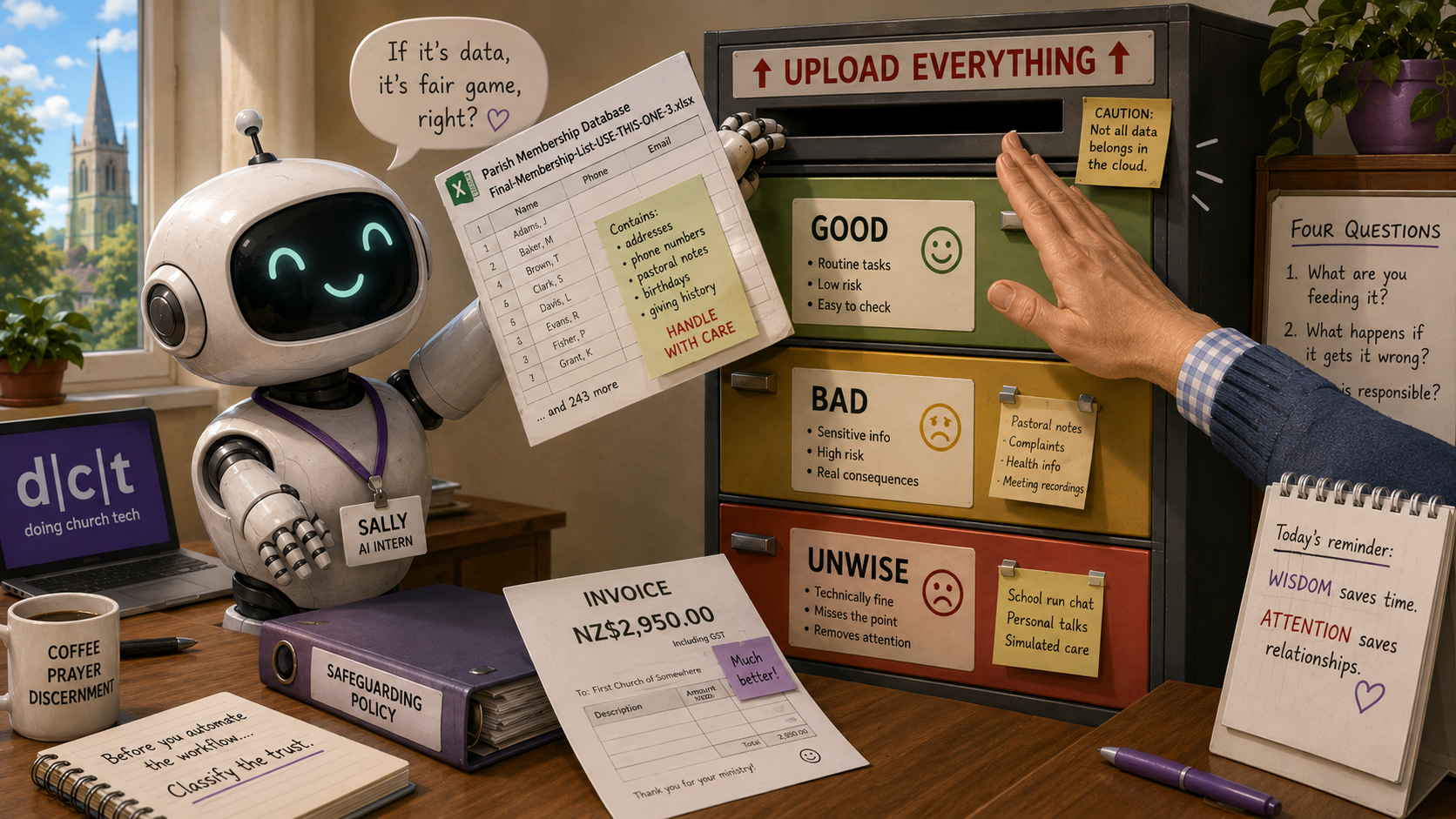
There’s no shortage of advice telling us what AI can do for us.

Sort your inbox. Summarise your meetings. Clean your spreadsheets. Personalise your emails. Draft your reports. Monitor what people are saying about you. Connect everything to everything else and reclaim hours of your life.

It all sounds marvellous.

Churches are particularly vulnerable to these lists because they’re short of time, short of volunteers and surrounded by repetitive administration. “Automate this” sounds like grace descending from the cloud — although, regrettably, it usually wants access to your contacts first.

Sally, Peter’s AI intern

The problem isn’t that all these automations are bad. Many are genuinely useful.

The problem is that “Can AI do this?” is usually the least interesting question.

The better one is:

Should AI do this — using this information, in this setting, with these consequences?

That’s where the cheerful productivity carousel begins making an ominous squeaking noise.

Ten easy things. What could possibly go wrong?

A recent Udemy article, 10 tasks you can automate with AI — no coding required, offers a useful example of the enormous quantity of practical AI advice now washing around the internet.

Its suggestions include sorting email, summarising meetings, extracting invoice data, cleaning spreadsheets, personalising campaigns, monitoring public sentiment and drafting content. The article isn’t unusually reckless. It includes sensible cautions: review generated emails before sending them, don’t expect a chatbot to handle complex support, and edit AI-generated content rather than publishing it untouched.

All good advice.

But the main safety question often arrives too late.

By the time we’re told to check the draft, we may already have connected the inbox, uploaded the contact list, recorded the meeting and sent the transcript wandering through several cloud services in search of an action list.

The missing step comes first:

Before you automate the workflow, classify the trust.

No code. No problem?

No-code tools are powerful because ordinary people can build useful workflows without becoming programmers.

You connect the form to the spreadsheet, the spreadsheet to the task list, and the task list to the person who has been ignoring it since Lent.

This can be excellent.

It can also mean that someone connects the church inbox, calendar, membership database and a public AI service during lunch.

By afternoon tea, the system is reading pastoral correspondence and drafting “personalised” messages to everyone named in Final-Membership-List-USE-THIS-ONE-3.xlsx.

No-code removes the coding barrier.

It does not remove the duty of care.

The good

Some AI automation is straightforwardly helpful.

It can turn an approved article into draft social-media posts. It can extract figures from invoices for the treasurer to verify. It can suggest a clearer heading, tidy public information or draft a routine acknowledgement.

These uses tend to be sound when:

  • the information is suitable for the system;
  • mistakes are easy to spot and correct;
  • a competent person checks the result;
  • responsibility remains human;
  • the automation removes drudgery rather than judgement.

Drafting a church-hall booking acknowledgement may save time.

Deciding whether a grieving family deserves an exception to the booking policy is not the same sort of task, even if both arrive through the same form.

The bad

Some uses cross much clearer lines.

Confidential information shouldn’t be fed into an AI system simply because summarising it would be convenient.

A chatbot shouldn’t invent pastoral, legal, safeguarding or financial advice.

An automated campaign shouldn’t simulate personal concern using details people never expected to be analysed for persuasion.

And an organisation shouldn’t combine information merely because the connectors have colourful icons and seem very pleased with themselves.

Meeting summaries are a good example.

Record the meeting, let AI produce the minutes, send everyone the action list, and enjoy the sudden reappearance of Tuesday evening.

That works beautifully until Property Committee moves from guttering to a tenant’s financial hardship, Parish Council discusses a complaint, or someone says something pastoral that was never meant to become cloud storage.

The risk level of a meeting isn’t set by its title.

It’s set by the most sensitive thing somebody says after the tea arrives.

AI may also struggle with the ancient church distinction between:

“We should consider doing this.”

“We have agreed to do this.”

and:

“Under no circumstances should Kevin do this again.”

A fluent summary isn’t necessarily an accurate one. Sometimes it’s merely wrong in complete sentences.

The unwise

The most interesting category isn’t the obviously good or obviously bad.

It’s the unwise.

These are uses that may be lawful. They may be clever. They may work precisely as designed.

They’re still something we should perhaps have had the sense not to build.

OpenAI founder Sam Altman recently posted what he described as a “cool use case”: connect your family calendars, tell ChatGPT about your children’s interests, and have it produce a personalised podcast for the drive to school. The programme might mention one child’s football game, another child’s birthday and some news. See Sam Altman’s original post on X.

Animator Alex Hirsch replied:

“What if you just talked to your children”

Brutal. Also fair. TechCrunch reported the exchange here.

I encountered the exchange through Mike Russell’s commentary in The AI Corner, where he described it as another reminder to define the problem you’re actually solving before trying to create a solution.

That is the question Altman’s example leaves hanging.

What problem is the podcast solving?

Perhaps a child would genuinely enjoy the format. Perhaps it would support a particular learning or accessibility need. Perhaps it could become a playful conversation starter.

But without a defined problem, we’ve connected family calendars and information about children to an AI system so it can tell the family things they already know about one another.

The drive to school was already a personalised daily audio experience.

It was called a conversation.

The deeper issue is that AI is increasingly sold not only as a way to reduce tedious work, but as a substitute for paying attention.

And attention is terribly inefficient.

Children tell stories with unnecessary detail.

Pastoral conversations refuse to fit neatly into database fields.

People ask questions already answered on the website.

Sometimes they don’t need the information. They need to know someone heard them.

We should be careful before describing all of that as friction.

Four questions before pressing Automate

We don’t need a 48-page AI governance framework written by a committee that has never opened ChatGPT.

Four questions will expose a surprising amount of nonsense.

1. What are you feeding it?

Public information is one thing.

Pastoral notes, complaints, health information, financial records, contact lists and information about children are quite another.

“Upload the spreadsheet” is not a neutral instruction when the spreadsheet is the parish roll.

2. What happens when it gets things wrong?

A poor social-media draft can be corrected before publication.

A false meeting summary, invented pastoral statement or wrongly classified complaint can do real damage.

Risk isn’t only about whether AI makes mistakes. It’s about what those mistakes can break.

3. Who is still responsible?

The chatbot isn’t.

The automation platform isn’t.

“AI made a mistake” will be cold comfort to the person affected by it.

Someone must own the workflow, understand its limits and have authority to stop it.

4. Are you removing drudgery — or removing attention?

This is the question most automation advice misses.

Are we saving someone from repetitive data entry?

Or saving them from listening?

Are we drafting a routine message?

Or manufacturing the appearance of personal concern?

Are we preparing for a difficult conversation?

Or avoiding it altogether?

Efficiency matters. It just isn’t the only thing that matters.

What is the saved time for?

The Udemy article is right about one important thing: tools that once required specialist development are now available to almost anyone with a browser and an idea.

That opens up genuinely useful possibilities.

Draft the routine email so someone has time for the difficult phone call.

Extract the invoice details so the treasurer can investigate what doesn’t reconcile.

Prepare the first version of the notice so the minister can concentrate on what it needs to say.

Summarise the public report so more people can understand it.

Those uses reduce effort without surrendering responsibility.

But sometimes the repeated, inefficient, stubbornly human activity is the work.

The conversation on the school run.

The careful reading of the complaint.

The pause when someone says they’re fine and plainly aren’t.

The message written for one person because they’re one particular person.

AI can help us save time.

Wisdom begins with knowing what the saved time is for — and what we mustn’t sacrifice to obtain it.

The Hybrid Meeting Problem

Hemi & Mereana always enjoyed it when it was their turn to provide supper for the parish meeting.

At some point in the last few years, most church committees discovered hybrid meetings.

Someone’s away.  Someone’s unwell.  Someone lives two hours away and would quite like not to drive at night.

So we say, quite reasonably:  “We’ll just make it hybrid.”

And for a while, it feels like a small miracle.  More people can attend.  Fewer apologies.  The meeting goes ahead.

It looks like inclusion.

And then, slowly… something shifts

You’ve probably seen it.

The people in the room start talking.  Not rudely — just naturally.  They can see each other.  They can read the room.  They build on each other’s ideas.

Meanwhile, on the screen:

  • someone unmutes just a fraction too late 
  • someone starts speaking and gets talked over 
  • someone decides it’s easier to stay quiet than interrupt 

And the meeting moves on.

No one’s been excluded. 

But not everyone has really been included either.

More than missing the biscuits

When you join a meeting remotely, you don’t just miss out on the coffee and biscuits.

You miss the side glances. 

The pauses. 

The moment where someone leans forward and says, “Hang on — I’m not sure about that.”

You miss the rhythm of the room.

And in a governance setting, that rhythm is where influence lives.

The problem we don’t name

Hybrid meetings don’t just change where people are.

They change how participation works.

And that matters most in the places we tend to care about most – the moments of discussion, discernment, and decision.

Because governance isn’t just about being present.  It’s about being able to contribute.

Where hybrid works beautifully

Before we throw the whole thing out — it’s worth saying this clearly.

Hybrid meetings are genuinely useful.

They work well for:

  • Information sharing — updates, briefings, reports 
  • Training and learning — where interaction is structured anyway 
  • Large gatherings — where not everyone is expected to speak 
  • Accessibility and participation — enabling people to be present who otherwise couldn’t be (but guardrails are needed …) 

In these settings, hybrid increases reach without significantly distorting the outcome.

That’s a good thing.

Where hybrid quietly struggles

The problems tend to show up when the meeting shifts from sharing to shaping.

  • testing ideas 
  • weighing options 
  • making decisions 
  • trying to reach consensus 

Because decisions tend to form where the conversation flows most easily.

And in hybrid meetings, that’s almost always in the room.

A polite fiction (and a governance risk)

Hybrid meetings create a very tidy story:  “Everyone was there.

And technically, that’s true.

But there’s a quieter question underneath it:

Did everyone have the same chance to shape what happened?

If the answer is “not quite”… – then we’ve moved from convenience into governance risk — even if no one intended it.

Why this keeps happening

It’s not bad behaviour.

It’s physics.  And people.

  • Sound takes a moment to travel 
  • Video adds a slight delay 
  • Interrupting a room you’re not in feels awkward 
  • Chairpersons naturally respond to the people they can see 

None of this is dramatic.  But it all adds friction.

And friction, over the course of a meeting, quietly redistributes influence.

This isn’t really a tech problem (but tech can help a bit)

Better microphones and cameras are useful.

But they don’t fix the core issue.

Because the problem isn’t whether people can connect. 

It’s whether they can participate on equal footing.

That said, some tools can reduce the gap slightly:

  • shared chat or Q&A tools (the introvert’s revenge) can give quieter voices a way in 
  • live polling can surface views that might not be spoken aloud 
  • structured digital feedback can slow things down just enough for remote voices to land 

These don’t replace conversation.

But they can help rebalance it — especially for those who find speaking up harder in any setting, not just online.

What can be done (without throwing the laptop out the window)

Hybrid meetings aren’t going anywhere.  Nor should they.

But they do need a bit more intentionality than we usually give them.

A few small shifts make a surprisingly big difference:

  • Flatten the room 
    If it’s an important discussion, consider having everyone join on their own device — even if they’re in the same building.  It feels odd.  It works.
    • Structure the conversation 
      Let’s hear from each person” isn’t overkill.  It’s inclusion made visible.
    • Watch the quiet voices 
      If someone hasn’t spoken, there’s usually a reason.  Good chairpeople notice that.
  • Separate discussion and decision 
    Talk together in hybrid.  Confirm decisions in a way that gives everyone equal voice — even if that’s a follow-up vote.

None of this is complicated. 

It’s just deliberate.

The uncomfortable bit

Hybrid meetings feel inclusive because they remove barriers to attendance.

But attendance isn’t the same as participation.

And participation isn’t the same as representation.

If we blur those together, we can end up with decisions that are technically shared… but practically shaped by whoever happened to be in the room.

Before your next meeting…

It might be worth asking one simple question:  “Will the people joining remotely be able to contribute as easily as the people in the room?

If the answer is “probably not”…  then the meeting needs a bit more thought before it starts.

Because good governance isn’t just about who’s present.

It’s about whose voice actually shapes the outcome.

One last thought

Hybrid meetings are a good tool.  They just aren’t a neutral one.

Used well, they open doors. 

Used casually, they can quietly narrow them again — just in less obvious ways.

So before your next meeting, take a moment.

Make sure you’re not leaving voices hanging at the end of the line.

Illustration created using AI image-generation tools for d|c|t.

Peter Lane is Principal Consultant at System Design & Communication Services and has over 30 years of experience with Technology systems.    We invite your questions, suggestions and ideas for articles.   These can be submitted either through the editor or by email to dct@dct.org.nz We also operate a website focused on building a community of people interested in improving how we use technology in churches, located at dct.org.nz  

The Funeral Problem

Sepia desert banner with a tumbleweed made of tangled cables. Bold text “What Could Possibly Go Wrong?” runs almost to the edge — a fitting metaphor for church systems that nearly work until they don’t.

Nothing tests a church’s technology like a funeral.

On a normal Sunday, the PowerPoint might freeze or the sound might squeal, and everyone sighs and carries on.  But at a funeral, the grieving family’s cousin turns up with a USB stick, the funeral director wants a tribute video right now, and the operator’s prayer is simple: Lord, let HDMI be merciful today.

The Funeral Problem Defined

“The Funeral Problem” is shorthand for any big, emotional service where the usual church systems are asked to cope with outsiders and surprises.  Weddings, carol services, school prizegivings — they all bring the same pressure.  But funerals are the clearest example: high emotion, high expectation, and no time for fixing cables.

And here’s the catch: what feels “good enough” on Sunday morning often falls apart when the funeral arrives.

Two Faces of the Problem

Sometimes, the outsider makes it work.  A cable gets rerouted, a bit of software is installed, or a laptop is plugged in directly.  The funeral runs smoothly, everyone is thankful — but by Sunday the volunteers are left with a mess.  The confidence monitor has vanished, the livestream no longer talks to the projector, and nobody knows what’s been changed.

Other times, it doesn’t work at all.  The slideshow won’t open, the sound cuts out, the video freezes.  And instead of quiet dignity, the room fills with stress.  Families remember the tribute that never played; volunteers remember the panic of being blamed; and the community remembers that this church’s system failed at a funeral.

Why It Matters

Technology glitches are annoying on Sunday.  At a funeral, they hurt.  Grief plus frustration is a painful mix, and a single failure can damage trust in the church’s care.

It’s tempting to shrug and say, “We’ll cope.”  But fragile systems invite shortcuts, and every outside event becomes a gamble.  True reliability isn’t just “it worked today” — it’s “it can reset and work again tomorrow.”

What Can Be Done

The good news is that churches don’t need fancy systems to do better.  Options include:

  • Investing for resilience: systems designed to reset easily, with confidence monitors and overflow screens that just work.
  • Stabilising what you have: fix broken cables, tidy workflows, and train volunteers.
  • Hoping for the best: the cheapest choice, but the riskiest — every funeral could be the one that fails.

The Pastoral Payoff

Reliable AV isn’t about looking professional.  It’s about care.  When families walk into church on one of the hardest days of their lives, they should be able to trust that the slideshow will run and the sound will hold.

Imagine a setup that just works — Sunday to Sunday, funeral to wedding, guest preacher to Christmas concert.  Reliability in our technology is hospitality in action.  It is one more way the church says: You are safe here.  We have prepared for you.

PS: d|c|t (Diaconate of Church Technologists) is also collecting stories for our upcoming Church+AI resource. If you’ve experimented with AI for rosters, sermons, or parish admin — or simply bumped into its challenges — we’d love to hear from you: dct.org.nz/church-ai.

Peter Lane is Principal Consultant at System Design & Communication Services and has over 30 years of experience with Technology systems.   We invite your questions, suggestions and ideas for articles.  These can be submitted either through the editor or by email to dct@dct.org.nz.  We also operate a website focused on building a community of people interested in improving how we use technology in churches, located at dct.org.nz.