
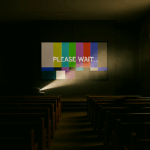
The Funeral Problem (Part 2)

Last month we named The Funeral Problem – how funerals expose every weakness in a church AV setup. This time we drop in on two friends, Sam and Jess, as they trade stories over coffee about how to survive it in practice

About Sam & Jess

Sam and Jess aren’t from the same church, or even the same tradition.  One’s used to more candles, one’s used to more guitars.  But they both wrangle church tech on Sundays, and every so often they meet for coffee in town.  That’s when the stories come out — the headaches, the hacks, and the lessons learned.  We get to listen in when the conversation turns to tech.

Sam: “I’m really pulling my hair out, Jess.  Every time someone uses the church for a funeral, it takes half of Sunday morning to put things back together again.  Projector in the wrong mode, cables swapped, and our poor volunteers staring at a blank screen.”

Jess: “Classic. Families just want the slideshow to work, so they’ll plug into anything that looks available.  Splitters, switchers, even straight into the projector.  It’s not sabotage — they just need it to work for that one service.”

The Trouble Spots

Sam: “So what do you see as the main weak points?”

Jess: “Well, first — the signal path . If you’ve got a splitter or switcher, label it clearly and keep it in sight.  Well, in sight once you’re in the tech booth, anyway.   If you’ve got some sort of dock or wall-plate, same deal.  Guests will find the unlabelled plug every time.”

Sam: “Our confidence monitor’s another.  It gets unplugged because someone decided it wasn’t important.”

Jess: “Yep. Those screens are like insurance.  The preacher doesn’t always need them, but when they do, it’s a lifesaver.  Keep it live every week, so people trust it.”

Sam: “Overflow’s a headache too.  We run our foyer from the livestream — fine for hymns, hopeless for tribute videos.”

Jess: “Exactly.  Direct feed beats internet every time.  Even a cheap HDMI splitter does better than YouTube when the video tribute is on.”

Sam: “And then someone waves an old iPhone at you and says, ‘The PowerPoint’s on here…’”

Jess: “That’s where you need your emergency parachute.  Best case: load everything onto a dedicated presentation laptop.  But when you can’t?  Wireless screen mirroring.  Not reliable enough for every week, but it’ll get you out of jail when the slides only exist on someone’s phone.”

Pick Your Level

Gold standard: Matrix or distribution amp, solid cabling, dedicated presentation PC.
Middle ground: Reliable splitter/switcher, confidence monitor always running, overflow fed direct.
Bare minimum: Replace flaky cables, tape down connections, keep a “reset to Sunday” checklist.
Emergency only: Fire up the wireless mirroring and pray the Wi-Fi holds.

The Takeaway

Sam: “So resilience isn’t really about fancy kit.  It’s about being able to reset to a known good state on Sunday.”

Jess: “Exactly.  The funeral director only cares about this service.  You care about every Sunday.  Build for that.”

👉 Next time Sam and Jess catch up, who knows where the conversation will go — rosters, OBS, maybe even website logins. But for today the question stands: would your setup survive the next funeral?

Read the Reflective Part 1 here → The Funeral Problem

We need your help !!

PS: d|c|t is also collecting stories for our upcoming Church+AI resource. If you’ve experimented with AI for rosters, sermons, or parish admin — or simply bumped into its challenges — we’d love to hear from you: dct.org.nz/church-ai.

The Funeral Problem

Sepia desert banner with a tumbleweed made of tangled cables. Bold text “What Could Possibly Go Wrong?” runs almost to the edge — a fitting metaphor for church systems that nearly work until they don’t.

Nothing tests a church’s technology like a funeral.

On a normal Sunday, the PowerPoint might freeze or the sound might squeal, and everyone sighs and carries on.  But at a funeral, the grieving family’s cousin turns up with a USB stick, the funeral director wants a tribute video right now, and the operator’s prayer is simple: Lord, let HDMI be merciful today.

The Funeral Problem Defined

“The Funeral Problem” is shorthand for any big, emotional service where the usual church systems are asked to cope with outsiders and surprises.  Weddings, carol services, school prizegivings — they all bring the same pressure.  But funerals are the clearest example: high emotion, high expectation, and no time for fixing cables.

And here’s the catch: what feels “good enough” on Sunday morning often falls apart when the funeral arrives.

Two Faces of the Problem

Sometimes, the outsider makes it work.  A cable gets rerouted, a bit of software is installed, or a laptop is plugged in directly.  The funeral runs smoothly, everyone is thankful — but by Sunday the volunteers are left with a mess.  The confidence monitor has vanished, the livestream no longer talks to the projector, and nobody knows what’s been changed.

Other times, it doesn’t work at all.  The slideshow won’t open, the sound cuts out, the video freezes.  And instead of quiet dignity, the room fills with stress.  Families remember the tribute that never played; volunteers remember the panic of being blamed; and the community remembers that this church’s system failed at a funeral.

Why It Matters

Technology glitches are annoying on Sunday.  At a funeral, they hurt.  Grief plus frustration is a painful mix, and a single failure can damage trust in the church’s care.

It’s tempting to shrug and say, “We’ll cope.”  But fragile systems invite shortcuts, and every outside event becomes a gamble.  True reliability isn’t just “it worked today” — it’s “it can reset and work again tomorrow.”

What Can Be Done

The good news is that churches don’t need fancy systems to do better.  Options include:

  • Investing for resilience: systems designed to reset easily, with confidence monitors and overflow screens that just work.
  • Stabilising what you have: fix broken cables, tidy workflows, and train volunteers.
  • Hoping for the best: the cheapest choice, but the riskiest — every funeral could be the one that fails.

The Pastoral Payoff

Reliable AV isn’t about looking professional.  It’s about care.  When families walk into church on one of the hardest days of their lives, they should be able to trust that the slideshow will run and the sound will hold.

Imagine a setup that just works — Sunday to Sunday, funeral to wedding, guest preacher to Christmas concert.  Reliability in our technology is hospitality in action.  It is one more way the church says: You are safe here.  We have prepared for you.

PS: d|c|t (Diaconate of Church Technologists) is also collecting stories for our upcoming Church+AI resource. If you’ve experimented with AI for rosters, sermons, or parish admin — or simply bumped into its challenges — we’d love to hear from you: dct.org.nz/church-ai.

Peter Lane is Principal Consultant at System Design & Communication Services and has over 30 years of experience with Technology systems.   We invite your questions, suggestions and ideas for articles.  These can be submitted either through the editor or by email to dct@dct.org.nz.  We also operate a website focused on building a community of people interested in improving how we use technology in churches, located at dct.org.nz.