
The Funeral Problem (Part 2)

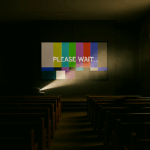
Last month we named The Funeral Problem – how funerals expose every weakness in a church AV setup. This time we drop in on two friends, Sam and Jess, as they trade stories over coffee about how to survive it in practice

About Sam & Jess

Sam and Jess aren’t from the same church, or even the same tradition.  One’s used to more candles, one’s used to more guitars.  But they both wrangle church tech on Sundays, and every so often they meet for coffee in town.  That’s when the stories come out — the headaches, the hacks, and the lessons learned.  We get to listen in when the conversation turns to tech.

Sam: “I’m really pulling my hair out, Jess.  Every time someone uses the church for a funeral, it takes half of Sunday morning to put things back together again.  Projector in the wrong mode, cables swapped, and our poor volunteers staring at a blank screen.”

Jess: “Classic. Families just want the slideshow to work, so they’ll plug into anything that looks available.  Splitters, switchers, even straight into the projector.  It’s not sabotage — they just need it to work for that one service.”

The Trouble Spots

Sam: “So what do you see as the main weak points?”

Jess: “Well, first — the signal path . If you’ve got a splitter or switcher, label it clearly and keep it in sight.  Well, in sight once you’re in the tech booth, anyway.   If you’ve got some sort of dock or wall-plate, same deal.  Guests will find the unlabelled plug every time.”

Sam: “Our confidence monitor’s another.  It gets unplugged because someone decided it wasn’t important.”

Jess: “Yep. Those screens are like insurance.  The preacher doesn’t always need them, but when they do, it’s a lifesaver.  Keep it live every week, so people trust it.”

Sam: “Overflow’s a headache too.  We run our foyer from the livestream — fine for hymns, hopeless for tribute videos.”

Jess: “Exactly.  Direct feed beats internet every time.  Even a cheap HDMI splitter does better than YouTube when the video tribute is on.”

Sam: “And then someone waves an old iPhone at you and says, ‘The PowerPoint’s on here…’”

Jess: “That’s where you need your emergency parachute.  Best case: load everything onto a dedicated presentation laptop.  But when you can’t?  Wireless screen mirroring.  Not reliable enough for every week, but it’ll get you out of jail when the slides only exist on someone’s phone.”

Pick Your Level

Gold standard: Matrix or distribution amp, solid cabling, dedicated presentation PC.
Middle ground: Reliable splitter/switcher, confidence monitor always running, overflow fed direct.
Bare minimum: Replace flaky cables, tape down connections, keep a “reset to Sunday” checklist.
Emergency only: Fire up the wireless mirroring and pray the Wi-Fi holds.

The Takeaway

Sam: “So resilience isn’t really about fancy kit.  It’s about being able to reset to a known good state on Sunday.”

Jess: “Exactly.  The funeral director only cares about this service.  You care about every Sunday.  Build for that.”

👉 Next time Sam and Jess catch up, who knows where the conversation will go — rosters, OBS, maybe even website logins. But for today the question stands: would your setup survive the next funeral?

Read the Reflective Part 1 here → The Funeral Problem

We need your help !!

PS: d|c|t is also collecting stories for our upcoming Church+AI resource. If you’ve experimented with AI for rosters, sermons, or parish admin — or simply bumped into its challenges — we’d love to hear from you: dct.org.nz/church-ai.

Installation tips for AV Display installation

Installing the Right AV Display

My last column looked at some of the principles of choosing the right AV Display – making sure that the capabilities and features of the display complement the reasons you want to have a display in the first place.  The surest way to waste AV money is to acquire devices that don’t actually meet the needs of the situation.  Another sure way is to not install systems properly.  Improper installation can lead to systems being “too hard” to use, create safety hazards and/or poor quality displays.

Front vs Rear projection

Front projection is where the projector is located, well, in front of the screen (the same side as the audience), the way 90% of projectors are used.  An equally valid way to use projector’s is Rear projection, where the projector is mounted behind the screen (the opposite side to the audience).  The screen is made from a special translucent material so the image projected can be seen from the audience side.  The projector mirrors the image so it still appears the right way around to the audience.

There are several advantages to rear-projection.  One is that it may suit the constraints of the location better and makes for an easier installation.  Rear projection is a good technique to consider in an environment where there are high ambient light levels.  Because the projector tends to be closer to the screen than with front projection schemes, watt for watt a rear projected image will be brighter.  Even better perceived brightness can be achieved by constructing a light-proof box around the space between the projector and the screen. 

Good security of the projection device can be achieved as the projector doesn’t have to be in the same room as the audience, so long as there is a window to let the projected image through.

Permanently Installed vs Not Installed

Of course, the ultimate security is to lock your projector away when not in use, and only set it up when it is in use.  The AV industry refers to this as an un-installed system.  This works particularly well for table-top projectors for small groups and meetings and of course provides scope for flexible use in multiple locations.  The disadvantage is that you need someone around that knows how to set the system up safely, and the time that can be taken in unpacking / packing.  Thinking about what the process needs to be in advance can allow measures to be implemented that will allow a system to be used safely and with minimum effort.  For example, installing a new electrical outlet at the location the projector will be used will allow quicker setup without having an extension lead draped across the space, thereby being both quicker and safer.

Structural Integrity

On the subject of safety, installed systems need to be fixed securely.  It may seem like an obvious statement, but attaching a display device to wallboard or other lining is insufficient in most circumstances.  Devices should be adequately fixed to the building’s structure, or equivalent.  Don’t judge the adequacy of a mounting by whether or not it falls down in the first 10-minutes.  From a Health & Safety perspective, it doesn’t matter if it falls down after 3-minutes or after 3-years – it still may be improperly fixed.  Suspended systems and devices need particular attention because of the level of hazard they can create.  In many cases, it worth seeking the opinion of a structural engineer on fitting or retro-fitting suspended systems

very old projector with text "How to Choose the Right AV Display"

How to Choose the Right AV Display

When I am talking to someone who has recently found out I am involved with AV professionally, I often get asked “What projector do you recommend”?

This is almost as hard to answer as the proverbial “How long is a piece of string”?  There are many factors to take into consideration, and most of those factors have nothing to do with the technical performance of the projector or other display device.  Further, there is a general assumption that only projectors can be considered as display devices, which is sometimes true, but not always.  Let’s look at some of those factors.

Mission

What are you trying to achieve by making this change?  Are you looking to display the words of hymns or worship songs for the congregation (so you can save the cost of paper copies)?  Replace Orders of Service?  Illuminate sermons? Or are you looking “to be more culturally relevant” to youth or society?  Do you want to provide a regular movie experience as a community outreach, or provide background content at a social enterprise café?  Or are you simply wanting a way to display the church council agenda during the meeting?

These types of questions are important because what you are trying to do will in a large measure determine what type of content you will want to display.  Hymns and Orders of Service is typically essentially text; content to amplify a sermon might be a mix of images, infographics and text.  Currently, “culturally relevant” is code for video material.  (By the way, to present video successfully you will need good audio system capability as well as the display system.)  A café might use a mixture of TV programming (video) and infographics material.

Different types of material have different requirements that need to be delivered by the solution.  Text needs to be clear, crisp and (above all) readable, so good resolution and good brightness levels are important.  Video needs a solution with very good contrast, and with the technical “grunt” to keep up with rendering 50 to 60 frames each and every second without missing a beat.  This is harder to measure objectively, but good video devices tend to have lots of internal processor power and internal memory.  Presentations can be text based or image based and so tend to need a combination of text and video requirements.

Readability

A critical factor for displaying text is how far the image is from the audience.  Obviously, the worst-case scenario are the people in the back corners – the size of the screen (especially the vertical size) makes a difference with this.  But a large screen may not be any good for viewers close to a display – if it is too big the display fills the field of vision and it becomes very difficult to read when you must physically turn your head to see each end of a line.  The rule of thumb used professionally is that the closest viewers should be more than 1½-times the height of the displayed image from the display, and the furthest viewer no more than 6-times the height of the displayed image.

The predominance of wide-screen formats for video material means that video is less dependent on vertical screen size, but instead depends more on horizontal screen size, within limits imposed by the aspect ratio of the format used.

Logistics & Installation

How do you need to operate your presentations?  Do you need to setup and pack away all your equipment every time you use it?  Are you going to use the equipment in the same place every time?  How technically savvy are your technology operators?

Solutions can be portable, semi-portable, semi-permanently installed or permanently installed.  Devices have been developed optimised for each of these scenarios.  One can select solutions that need to be installed at the edge of a space, or in the middle of a space. 

A potential solution needs to be considered in the context of both what you are trying to achieve and the constraints and advantages of the space (or spaces) in which you are going to use it.

So, before you go shopping for a display device, do yourself a favour and make sure you understand why you want it, and what that means the device you end up with needs to do.